Investor Guide · October 2026
How to Invest in Fractional Real Estate With the Amtaar App: A Step-by-Step Walkthrough
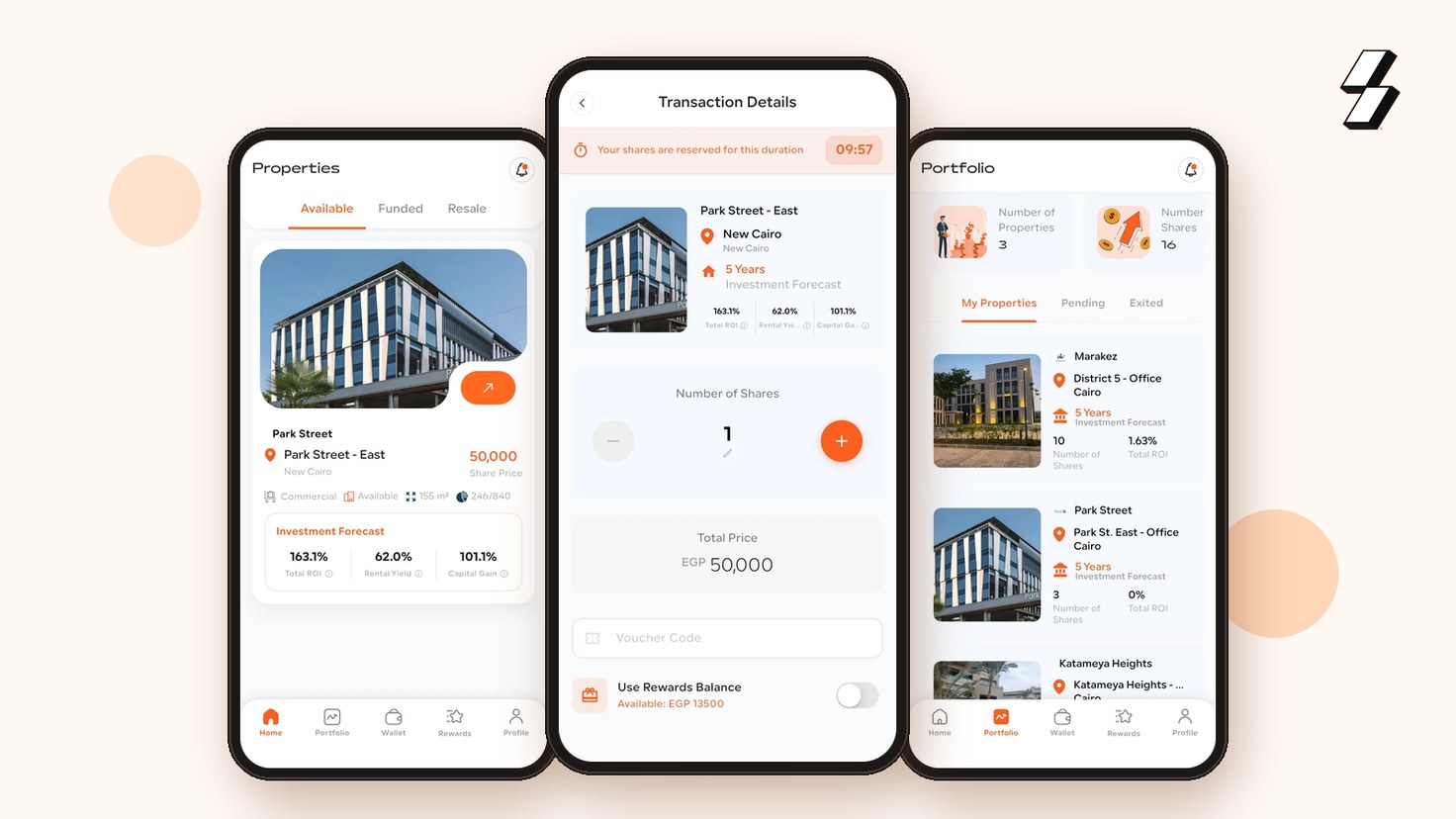
Buying a share of a commercial property used to involve lawyers, bank visits and a large cheque. With the Amtaar app it takes a few minutes and starts from one share. This walkthrough follows a first investment from download to signed contract, explains what you pay and when you start earning, and points to the detailed App Guide for each screen.
Step 1: Download the app and sign up
Download Amtaar free from the App Store or Google Play. Sign up with your Egyptian mobile number and the 6-digit code sent by SMS. There is no password to remember: you log in with a 6-digit PIN, and fingerprint or Face ID login is optional.
The app works in Arabic and English, and you can switch language at any time from Profile → Language.
Step 2: Verify your profile
Amtaar is a regulated investment platform, so you verify who you are before you can buy shares. Confirm your phone and your email, create your PIN, and complete a short face check with your national ID. Investing stays locked until all four steps are done, and the app tells you which step is missing.
Step 3: Choose a property
On the Home tab, open Available to see properties open for investment. Each card shows the share price, the area, how many shares are left and the investment forecast. Tap a property to read its page: the share price and whole-unit price, photos, developer, amenities, location and a 5-year forecast split into rental yield and capital gain.
The forecast is Amtaar's projection, not a guarantee. Rental income depends on the tenant paying rent, and capital gain depends on the property market. Read the whole page before you invest.
Step 4: Choose your shares and check out
At the bottom of the property page, set the number of shares with − and +. The minimum is one. Tap Invest, and your shares are reserved for 10 minutes while you complete the payment.
The checkout shows the amount, Amtaar's 2.5% commission, any processing fee (currently EGP 0), any discount and the total. For example, one share at EGP 50,000 plus EGP 1,250 commission comes to EGP 51,250. You can apply a voucher code or use your rewards balance to reduce the amount.
Step 5: Pay
Pay by bank transfer or InstaPay to the Amtaar account shown in the app, with your personal reference ID in the transfer notes, then upload the receipt before the 10-minute timer ends. If you have money in your Amtaar Wallet, turn on “Use your wallet balance to invest”. If it covers the total there is nothing to transfer, and if it covers part, you transfer only the rest.
Only transfer to the bank details shown inside the app, and transfer the exact total. Your order then appears under Portfolio → Pending while our finance team reviews it.
Step 6: Receive your shares and contract
When the payment is accepted and the property's funding is complete, your shares are issued, you get an “Investment Confirmed” notification, and the property moves to Portfolio → My Properties.
When your contract is ready, download it, sign it and upload the signed copy in the app. Once approved, it is kept under Profile → Property Contracts. Your shares earn rent from the 1st of the month after your purchase, and payouts arrive in your wallet every quarter.
Questions investors ask
What is the minimum investment in the Amtaar app?
One share of a property. The share price is shown on each property, for example EGP 50,000 for Park Street East.
What fees do I pay when I invest?
A 2.5% Amtaar commission, shown at checkout before you pay. One EGP 50,000 share costs EGP 51,250 in total. The processing fee is currently EGP 0.
How can I pay for my shares?
By bank transfer or InstaPay with a receipt upload, from your Amtaar Wallet balance, or a mix of both. Vouchers and referral rewards can reduce the amount.
How long are my shares reserved at checkout?
10 minutes. Upload your proof of payment before the timer ends, or the shares are released.
When do my shares start earning?
From the 1st of the month after your purchase. Rental income is paid quarterly into your Amtaar Wallet.
Can I sell my shares in the app?
Not yet. The Resale tab shows “Coming soon”. To sell, contact Amtaar support and the team will arrange the sale with you.